
Sync your Contacts for Google11.6 - App Store
You'll be able to see results in few seconds.
Publisher Description

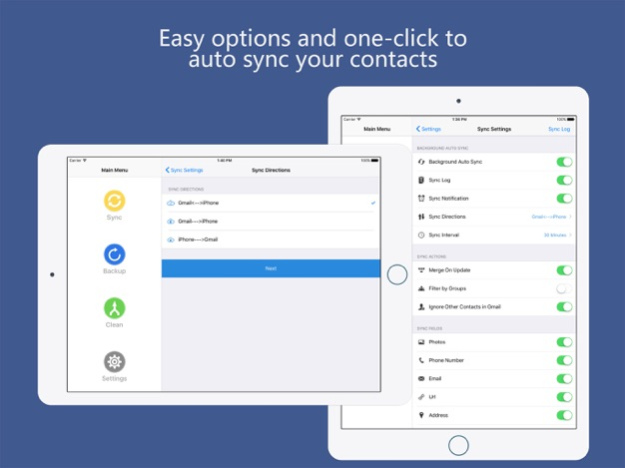
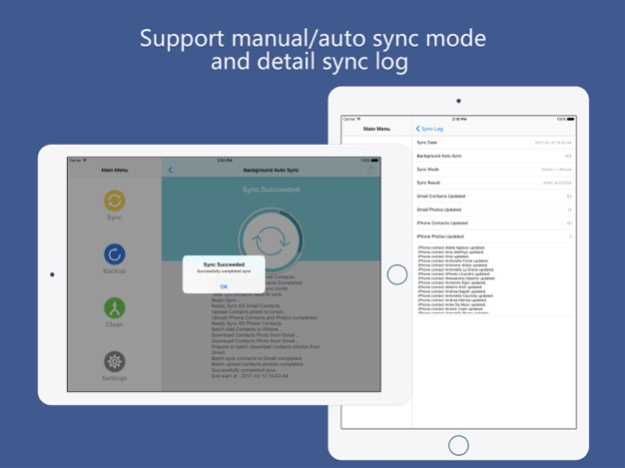
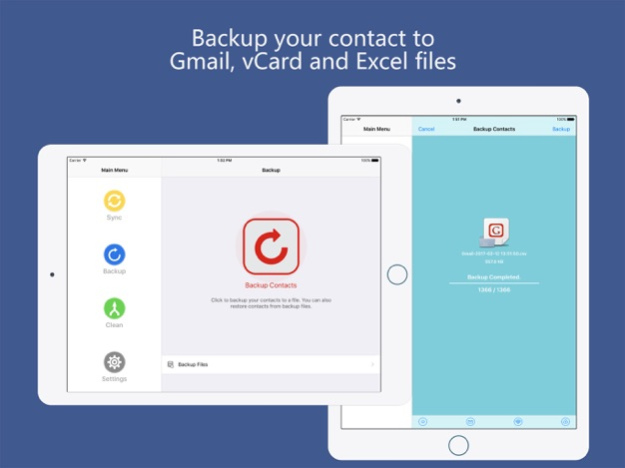
"Contacts Sync" keep your contacts up-to-date with their information and avatar from Google Gmail.
---SUPPORT BACKGROUND AUTO SYNC
---SUPPORT SYNC CONTACTS & GROUPS
---SUPPORT SYNC CONTACTS AVATAR
---SUPPORT BACKUP TO GMAIL,EXCEL,OUTLOOK,VCARD
---SUPPORT CLEAN & MERGE DUPLICATE CONTACTS
---OVER 1,000,000 PEOPLES DOWNLOAD THIS APP
“Contacts Sync” permits you to synchronize Gmail & iPhone contacts information quickly and easily. By this tool, you can sync contacts between iPhone device and other mobile devices easily. This application supports iOS9+ system.
“Contacts Sync” makes you synchronize Gmail & iPhone contacts information quickly and easily, and then you can conveniently visit your contacts information at anywhere. This application was carefully designed, most operations are “A key to finish”, thus can dramatically improve work efficiency, especially the “Smart Sync” technology can automatically recognize same name as the contacts in Gmail & iPhone and make smart merge, and guarantees must not generate repeat contacts information or any spam.
"Contact Sync" support background auto sync mode, when the application enter background, it still be able to automatically synchronize your contacts with Gmail. This feature ensures that your iPhone and Gmail contacts are always kept up to date.
“Contacts Sync” supports synchronizes contacts group information. For example, a Gmail or iPhone contact is divided into FRIEND, FAMILY or PARTNER group, and then after the synchronization is completed, the corresponding Gmail or iPhone contact will be divided into corresponding group.
“Contacts Sync” supports synchronize contacts avatar. It can synchronize set contacts avatar to corresponding Gmail or iPhone contact when you synchronize contacts information, this function greatly makes the use easily.
In addition, this application provides numerous customizable features, which means you can conveniently control every contact synchronization mode and content. For example you can use “Smart Sync” or “Single Sync”, depends on the purpose of synchronization.
1) Backup iPhone contacts, now you can use single sync mode, “iPhone -> Gmail”, frequently backup local contacts to Gmail to prevent mobile phone is lost or damaged.
2) Mobile phone migration. Replaced new phone needs have up-to-date contact information, you can use single sync mode, “Gmail -> iPhone”, then you can restore your backup contacts to a new phone.
3) Synchronize between multiple devices. You can use “Smart Sync” mode to make the up-to-date contacts information in Gmail & iPhone a thorough merge, maintain unity of multiple devices contacts information.
********************
FEATURES:
********************
*Allows you to merge changes you've made to your iPhone contacts with changes you've made to your Gmail contacts
*Automatic identification of contacts of share same name, and intelligent combination to prevent duplicate contacts
*Browser Gmail contacts & groups online without synchronization
*Sync all contact fields including:
- Contact names, nicknames, notes
- Company names, job titles, departments
- Birthdays
- Phones
- Mails
- Instant Messaging
- Postal Addresses
- Relationships
- Events
- Web sites
*Syncs groups, photos and custom labels
*Features "Filter by Groups" that allow you to sync contacts in special groups
*Features Remove duplicate contacts that allow you to merge duplicate contacts in iPhone address book to one single contact before synchronization
*Features reminder can be timed to remind you to sync your contats with Gmail
Jan 5, 2025
Version 11.6
Performance and stability improvements
About Sync your Contacts for Google
The company that develops Sync your Contacts for Google is 峥 俞. The latest version released by its developer is 11.6.
To install Sync your Contacts for Google on your iOS device, just click the green Continue To App button above to start the installation process. The app is listed on our website since 2025-01-05 and was downloaded 0 times. We have already checked if the download link is safe, however for your own protection we recommend that you scan the downloaded app with your antivirus. Your antivirus may detect the Sync your Contacts for Google as malware if the download link is broken.
How to install Sync your Contacts for Google on your iOS device:
- Click on the Continue To App button on our website. This will redirect you to the App Store.
- Once the Sync your Contacts for Google is shown in the iTunes listing of your iOS device, you can start its download and installation. Tap on the GET button to the right of the app to start downloading it.
- If you are not logged-in the iOS appstore app, you'll be prompted for your your Apple ID and/or password.
- After Sync your Contacts for Google is downloaded, you'll see an INSTALL button to the right. Tap on it to start the actual installation of the iOS app.
- Once installation is finished you can tap on the OPEN button to start it. Its icon will also be added to your device home screen.
Program Details
System requirements
Download information
Pricing
Version History
version 11.6
posted on 2025-01-05
Jan 5, 2025
Version 11.6
Performance and stability improvements
version 11.4
posted on 2024-05-13
May 13, 2024
Version 11.4
Performance and stability improvements
version 11.3
posted on 2024-02-20
Feb 20, 2024
Version 11.3
Performance and stability improvements
version 11.2
posted on 2024-01-15
Jan 15, 2024
Version 11.2
Optimized for iPhone 15 and iOS 17
Bug fixes and stability improvements
version 11.1
posted on 2022-04-24
Apr 24, 2022 Version 11.1
Performance and stability improvements
version 11.0
posted on 2022-04-18
Apr 18, 2022 Version 11.0
Added backup of Google contacts
Added clean up Google Contacts
Added Merge Google Duplicate Contacts
Performance and stability improvements
version 10.8
posted on 2022-04-10
Apr 10, 2022 Version 10.8
Performance and stability improvements
version 10.6
posted on 2022-03-23
Mar 23, 2022 Version 10.6
Performance and stability improvements
version 10.3
posted on 2022-02-27
Feb 27, 2022 Version 10.3
Fix issues with Dark Mode
version 10.2
posted on 2022-02-23
Feb 23, 2022 Version 10.2
Fix in-app purchase issues.
Disclaimer
Official App Store Link
We do not host Sync your Contacts for Google on our servers. We did not scan it for viruses, adware, spyware or other type of malware. This app is hosted by Apple and passed their terms and conditions to be listed there. We recommend caution when installing it.
The App Store link for Sync your Contacts for Google is provided to you by apps112.com without any warranties, representations or guarantees of any kind, so access it at your own risk.
If you have questions regarding this particular app contact the publisher directly. For questions about the functionalities of apps112.com contact us.
